






Ultimate Guide to UCSD VPN: Secure Access from Anywhere
UCSD (University of California, San Diego) provides its students, staff, and faculty with secure access to the university’s internal resources via UCSD VPN. Whether you’re off-campus or traveling abroad, UCSD VPN allows you to access essential databases, academic materials, and other restricted resources safely. This article will guide you through every aspect of UCSD VPN—setup, troubleshooting, security features, and more.
What is UCSD VPN and Why Should You Use It?
What Exactly is a VPN?
A Virtual Private Network (VPN) is a technology that allows you to create a secure connection to another network over the internet. When using UCSD VPN, your data is encrypted, making it virtually impossible for third parties (such as hackers) to monitor your activities. A VPN is essential when accessing sensitive university resources or working from off-campus locations.
The Importance of UCSD VPN for Students and Faculty
UCSD VPN provides faculty, staff, and students with secure access to the university’s internal networks, including library resources, academic journals, and campus-specific systems. Whether you’re in another city, country, or simply working from home, UCSD VPN ensures you can securely access materials necessary for research, classes, and other academic functions.
Key Benefits of UCSD VPN
-
Security: All traffic between your device and UCSD’s network is encrypted, protecting your data from potential eavesdropping or interception.
-
Remote Access: You can access UCSD’s online resources and tools even if you’re physically off-campus, from anywhere in the world.
-
Privacy: UCSD VPN hides your real IP address and provides you with the network’s IP, ensuring anonymity while you browse and access restricted resources.
How to Set Up UCSD VPN on Different Devices
Setting Up UCSD VPN on Windows
Setting up the UCSD VPN on your Windows device is a straightforward process. Follow these simple steps:
-
Download the VPN Client:
-
Navigate to the UCSD VPN Download Page.
-
Select the version compatible with your system (e.g., Windows 10, 11).
-
Download and install the GlobalProtect VPN client.
-
-
Install the VPN Client:
-
Open the downloaded file and follow the prompts to install the software.
-
Once installed, launch the GlobalProtect VPN Client from the Start menu.
-
-
Connect to UCSD VPN:
-
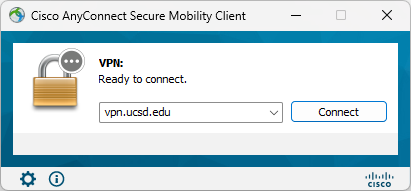
Open the VPN client and enter your UCSD username and password.
-
Click the Connect button.
-
Once connected, you’ll have secure access to UCSD’s network and resources.
-
Setting Up UCSD VPN on macOS
-
Download the GlobalProtect VPN Client for macOS:
-
Visit the official UCSD VPN website.
-
Choose the macOS version and download the file.
-
-
Install the VPN Client:
-
Open the downloaded file and follow the installation steps.
-
Open the GlobalProtect VPN Client.
-
-
Connect to UCSD VPN:
-
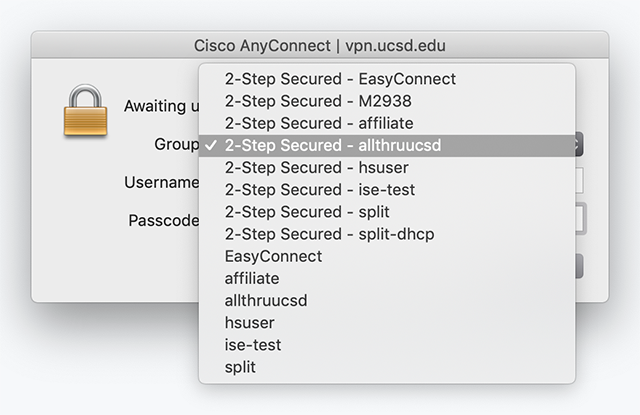
Enter your UCSD username and password to connect securely.
-
After successful authentication, you can access restricted UCSD resources.
-
UCSD VPN Setup on iOS and Android
Setting up UCSD VPN on mobile devices is equally simple:
-
Download the GlobalProtect App:
-
Go to the App Store for iOS or Google Play Store for Android.
-
Search for GlobalProtect and download it.
-
-
Install and Open the App:
-
Open the app, and enter your UCSD username and password when prompted.
-
-
Connect and Enjoy Remote Access:
-
Once connected, you’ll have the ability to access UCSD resources securely on your mobile device.
-
UCSD VPN Comparison: Which VPN Method Works Best for You?
Overview of UCSD VPN Options
| VPN Method | Features | Pros | Cons |
|---|---|---|---|
| UCSD VPN Client | Direct UCSD VPN access through GlobalProtect client | High security, reliable, easy setup | Slightly slower speeds compared to other VPNs |
| GlobalProtect VPN | Primary VPN option for UCSD campus users | Fast, reliable connection | Requires installation of client software |
| OpenVPN | Third-party VPN client | Customizable, flexible settings | Can be challenging for beginners to set up |
Choosing the Right VPN Option for Your Needs
-
UCSD VPN Client is ideal for most students and staff who need easy access to UCSD’s resources. It’s secure and optimized for speed.
-
GlobalProtect VPN provides the best overall experience for anyone needing reliable remote access with minimal setup.
-
OpenVPN is best for advanced users who need maximum control over their VPN connection and are comfortable with technical configurations.
UCSD VPN Troubleshooting: Quick Fixes for Common Problems
“I Can’t Connect to UCSD VPN—What’s Going Wrong?”
-
Check Your Internet Connection:
-
Ensure your device is connected to the internet.
-
-
Verify VPN Server Status:
-
Visit UCSD’s VPN status page to check for any outages or maintenance.
-
-
Reboot Your Device:
-
Restart your device to refresh the connection.
-
-
Clear Cache and Reinstall the VPN Client:
-
If the issue persists, try clearing the cache or reinstalling the VPN client.
-
“UCSD VPN is Very Slow—How Do I Fix It?”
-
Choose a Different Server:
-
UCSD VPN offers multiple server options; select the one closest to your physical location for better speed.
-
-
Limit Bandwidth Usage:
-
Disconnect unnecessary devices from the internet to free up bandwidth.
-
-
Contact IT Support:
-
If you experience consistent issues, UCSD’s IT support team can help optimize your connection.
-
UCSD VPN Security Features You Should Know About
Encryption Protocols Used by UCSD VPN
UCSD VPN employs several layers of encryption, including SSL (Secure Sockets Layer) and IPSec (Internet Protocol Security). These protocols ensure that data traveling from your device to the UCSD network is unreadable by potential attackers.
How UCSD VPN Protects Your Privacy
When connected to UCSD VPN, your real IP address is hidden, and all browsing activity appears as if it’s originating from the UCSD network. This ensures that your activities are private, even when using public Wi-Fi.
Multi-Factor Authentication (MFA) and UCSD VPN
For additional security, UCSD VPN uses Multi-Factor Authentication (MFA). This requires users to verify their identity through a secondary method (like a code sent to your phone or email) before gaining access to the network.
Frequently Asked Questions About UCSD VPN
1. What is UCSD VPN?
UCSD VPN is a secure tool that allows you to access UCSD’s network and academic resources remotely. It ensures your data remains protected and encrypted while off-campus.
2. How do I set up UCSD VPN on my device?
Follow the step-by-step setup guide mentioned above for Windows, macOS, or mobile devices. The process is straightforward and user-friendly.
3. Can I use UCSD VPN for personal browsing?
UCSD VPN should primarily be used for academic purposes. However, it can be used for secure browsing if needed.
4. How do I reset my UCSD VPN password?
To reset your UCSD VPN password, visit the UCSD Account Management page and follow the instructions.
5. How do I troubleshoot UCSD VPN connection issues?
If you experience issues connecting to UCSD VPN, try restarting your device, ensuring your internet connection is stable, and reinstalling the VPN client. For further help, contact UCSD IT support.
6. Can I use UCSD VPN while traveling abroad?
Yes, you can use UCSD VPN while traveling abroad to access university resources securely. Just ensure your device is configured with the correct VPN settings.
7. Does UCSD VPN work on Linux operating systems?
Yes, UCSD VPN can be configured on Linux systems, though the setup may be more technical. Refer to the official UCSD VPN documentation for detailed instructions.
8. Will UCSD VPN slow down my internet connection?
Some slowdown may occur because VPN encrypts your internet traffic. If the speed is significantly reduced, try connecting to a different VPN server or check your internet connection.
9. How do I disconnect from UCSD VPN?
To disconnect, open the VPN client and click on the “Disconnect” button. This will safely terminate your VPN session, restoring normal internet connectivity.
Customer Support for UCSD VPN: Where to Get Help
UCSD VPN Help Desk Contact Information For issues related to UCSD VPN, you can contact UCSD’s IT support team:
-
Email: ucsd-help@ucsd.edu
-
Phone: +1 (858) 534-3150
-
Website: UCSD VPN Help Page
Conclusion: UCSD VPN is Essential for Remote Access
Summary of Key Features
UCSD VPN provides the most secure method for accessing UCSD’s network and resources from remote locations. Its high encryption standards and user-friendly setup process make it an essential tool for students, faculty, and staff alike.
Final Thoughts
Using UCSD VPN ensures that your remote access is both secure and reliable. Whether you’re conducting research, attending classes, or simply browsing academic materials, UCSD VPN is your gateway to a secure online experience.


